How Does Robotic Process Automation Work? 2026 Guide
Reviewed by Tue Nguyen, Chief AI Officer at Savvycom
At a business luncheon EuroCham organized with our team in Hanoi on 27 August 2026, the question executives asked most often was not about large language models. It was “where should we actually start?”. For most operations-heavy businesses, the honest answer is still the same place it was five years ago: the repetitive, rule-based back-office work that eats staff hours every day. That is robotic process automation territory.
Robotic process automation (RPA) is software that mimics how a person interacts with digital systems: opening applications, copying data between screens, filling forms, and sending files. This guide explains how RPA works step by step, what has changed now that AI agents have entered the picture, and how to tell whether a process in your business is a good candidate.
1. What is robotic process automation (RPA)?

RPA works like a team of digital assistants that handle repetitive tasks using software bots
The practical appeal is simple. A bot works around the clock, does not mistype, and does not resign after six months of copying invoice numbers. Demand keeps growing accordingly: Grand View Research projects the global RPA market will reach $35.84 billion by 2033, with AI-assisted automation as the main growth driver.
One distinction worth making early: RPA is not the same as an API integration. An API connects systems at the data layer, which is cleaner but requires both systems to expose one. RPA works at the user-interface layer, so it can automate across legacy applications that have no API at all. That is precisely why banks, hospitals, and logistics operators running systems built 15 years ago adopted it first.
2. How does robotic process automation work, step by step?
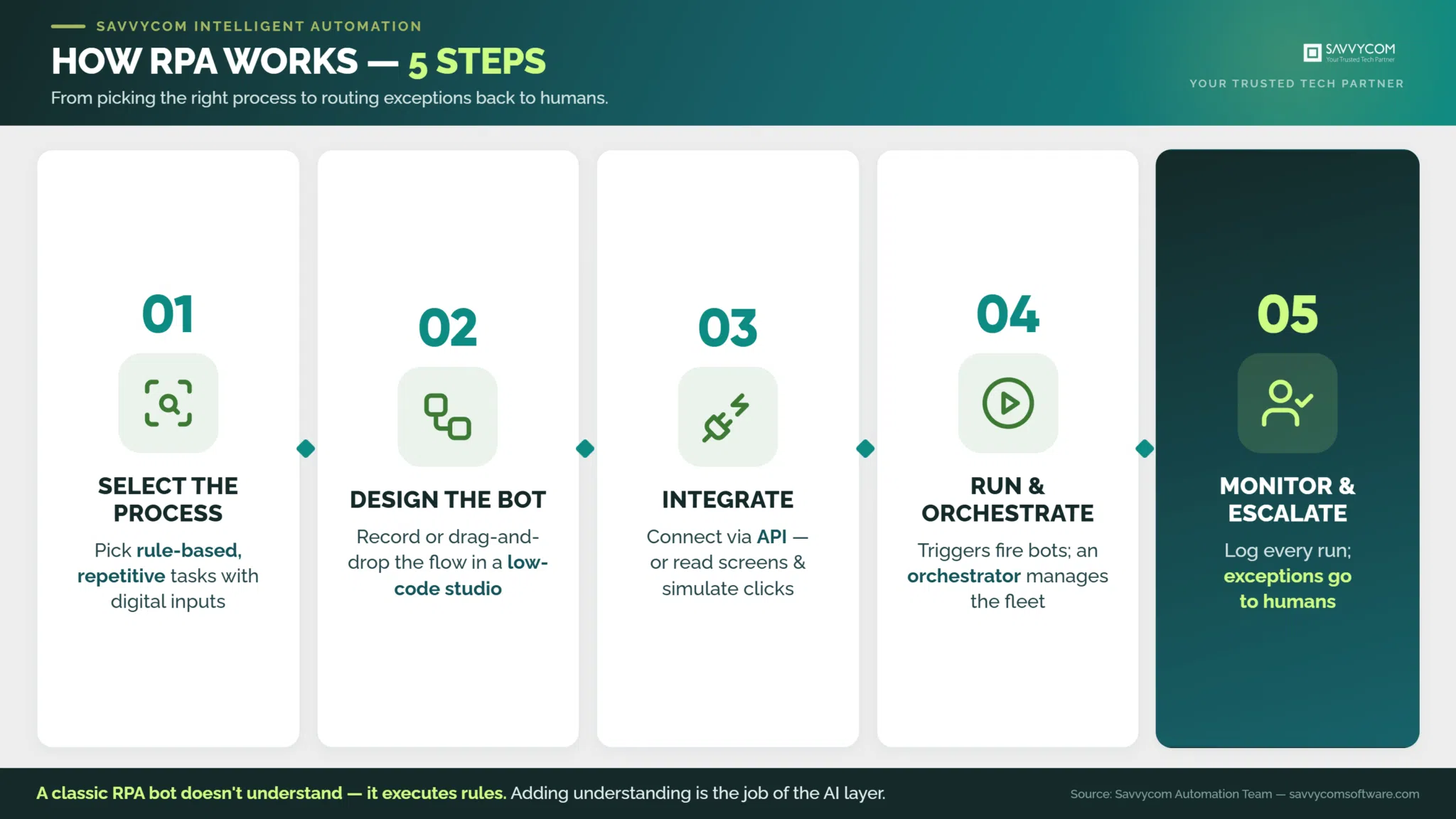
Here is what each stage looks like in a real deployment:
- Process selection and discovery. The team maps how the task is actually done today, including the workarounds nobody documented. The best candidates follow clear rules, run on digital inputs, and repeat often. Process mining tools help, but in our delivery experience a structured workshop with the people doing the work surfaces more truth than logs alone.
- Bot design. Developers build the workflow in an RPA studio (UiPath, Automation Anywhere, and Microsoft Power Automate are the common choices), either by recording a person performing the task or by assembling drag-and-drop actions. Every decision point becomes an explicit rule: if the invoice total matches the purchase order, post it; if not, flag it.
- Integration. The bot is wired to the applications it touches. Where an API exists, use it, because API connections survive interface redesigns. Where none exists, the bot reads screens and simulates clicks. Most enterprise deployments mix both.
- Execution and orchestration. Bots run on triggers (a file lands in a folder, an email arrives, a schedule fires) and an orchestrator manages queues, credentials, and workload across the bot fleet. This is also where attended and unattended modes diverge, which the next section covers.
- Monitoring and exception handling. Every run is logged. Transactions the bot cannot resolve go to a human review queue. Teams track exception rates over time, because a rising rate is usually the first sign that an underlying application changed and the bot needs maintenance.
Notice what is missing from that list: intelligence. A classic RPA bot does not understand anything. It executes rules. That limitation is exactly what the AI layer described in section 4 was built to fix.
3. What are the main types of RPA?

How attended and unattended RPA operate in practice
|
Mode |
How it runs |
Best for |
Trade-off |
|
Attended |
Launched by an employee on their own machine, mid-task |
Contact centers, front-office lookups, guided data entry |
Depends on the employee’s machine and session staying stable |
|
Unattended |
Runs on servers or VMs on schedules and triggers, no human present |
Batch back-office work: reconciliation, claims, reporting |
Needs orchestration, credential vaulting, and exception queues |
|
Hybrid |
Attended and unattended bots hand work to each other |
End-to-end processes with both customer-facing and back-office steps |
More moving parts, so governance matters more |
4. How do RPA and AI work together in 2026?
A concrete example from our own delivery work. A U.S. healthcare organization was drowning in patient and billing documents that arrived in inconsistent formats, and hiring more administrative staff could not clear the backlog. Savvycom built a Document Intelligence platform combining OCR, LLM-assisted validation, and configurable automation rules feeding the client’s ERP and operations systems. The pipeline is a textbook RPA-plus-AI split: AI models read and validate each document, then rule-based automation moves the verified data into downstream systems. Measured after rollout against the previous manual workflow, manual data entry fell by 50 to 70 percent and data accuracy improved by 30 to 50 percent, depending on document type.
The newer shift is agentic. AI agents can plan multi-step work and adapt to situations no one scripted, which classic bots cannot. That does not make RPA obsolete. It changes its role:
|
|
RPA bots |
AI agents |
|
Logic |
Deterministic rules; the same input gives the same output |
Probabilistic reasoning; adapts to context |
|
Strength |
Reliability, auditability, compliance-friendly logs |
Handling ambiguity, unstructured inputs, planning |
|
Weakness |
Breaks when the process or UI changes |
Can be wrong confidently; harder to audit |
|
2026 role |
The reliable hands: executing transactions |
The decision layer: routing, judgment, orchestration |
In regulated industries this pairing is the sensible architecture: let the agent decide, let the bot execute, and keep a deterministic, auditable trail of every transaction. For a deeper look at how these AI capabilities are built, see our guide to enterprise AI development.
5. What are the real benefits of RPA?
- Speed on repetitive throughput. For a leading South Korean logistics conglomerate, our team built an AI-assisted contract review platform that cut review time by 50 percent over a three-month build, measured against the legal team’s previous fully manual process, while identifying critical clauses with 95 percent accuracy.
- Accuracy and compliance. Bots do not skip steps at 4 pm on a Friday. Every action is logged, which auditors in banking and healthcare value more than any speed metric.
- Scalability without hiring curves. When a Philippines digital finance provider could not keep identity verification staffing in line with customer growth, an automated eKYC platform absorbed the volume instead: manual verification workload fell by more than 60 percent and onboarding time dropped by more than half compared with the pre-automation process.
- Employee focus. The point is not headcount reduction. In every project above, the same people moved from typing data to handling the exceptions and edge cases that actually need judgment.
6. What are the limitations and common failure points of RPA?
- Brittleness. A UI-level bot depends on screens staying the same. A vendor pushes a redesign, the bot breaks, and the process silently stops. Mitigation: prefer API connections where possible and watch exception rates as an early-warning signal.
- Maintenance debt. Ten bots are easy. A hundred bots are a different story: without a Center of Excellence that owns standards, versioning, and bot inventory, the fleet turns into unmanaged shadow IT. Budget maintenance as a meaningful share of build cost from year one.
- Security and credentials. Bots log into systems with real permissions. Credential vaulting, least-privilege access, and audit trails are requirements rather than add-ons, especially under banking and healthcare compliance regimes.
- Wrong process, wrong tool. Tasks that need discretion, empathy, or frequent exceptions resist rule-based automation. Forcing them into RPA produces exception queues longer than the original workload.
7. Where is RPA used across industries?
- Banking and financial services. Account opening, KYC verification, reconciliation, and regulatory reporting are the classic entry points. Our detailed guide covers RPA applications in banking.
- Healthcare. Patient scheduling, claims processing, prior authorization, and records management, where the document-heavy workflows described in section 4 dominate. More in our piece on RPA in healthcare.
- Logistics and supply chain. Order entry, shipment status updates, customs documentation, and invoice matching across carrier portals that will never share an API.
- Manufacturing and back office generally. Purchase-order processing, master-data upkeep, and production reporting, usually as a bridge between shop-floor systems and ERP.
8. How do you know a process is a good fit for RPA?
RPA fit check: answer for one specific process
Frequently asked questions
Is RPA the same as artificial intelligence?
No. RPA follows predefined rules and cannot learn or interpret, while AI models make probabilistic judgments from data. They complement each other: AI reads documents and makes decisions, RPA executes the resulting transactions. Combined deployments are usually called intelligent automation or hyperautomation.
What tasks can RPA automate?
RPA automates rule-based digital tasks: data entry and migration, invoice and claims processing, reconciliation, report generation, KYC checks, order entry, and system-to-system copying where no API exists. Tasks requiring judgment, empathy, or frequent exceptions need human handling or an AI layer on top of the bots.
How long does it take to implement RPA?
A first production bot for a well-defined process typically ships in two to eight weeks. Full automation platforms take longer: our recent intelligent-automation projects ran three to nine months from workflow analysis to production, depending on document complexity, integration count, and compliance requirements.
How much does RPA cost?
Cost depends on license model, bot count, and build complexity. Budget three components: platform licenses, development of each automated process, and ongoing maintenance, which teams most often underestimate. Evaluate cost per process against the hours it returns rather than judging the platform price in isolation.
Will AI agents replace RPA?
Not in regulated, transaction-heavy environments. Agents are better at ambiguity but harder to audit, so enterprises increasingly use agents as the decision layer and RPA bots as the deterministic execution layer. Existing bot estates are being extended with AI capabilities rather than discarded.
Related reading
- What Is AI Development? A Complete Guide
- RPA 101: Applications of RPA in the Banking Industry
- RPA 101: Applications of RPA in the Healthcare Industry
Looking for a Trusted Tech Partner That Delivers Your Measurable Values?
Savvycom delivers intelligent automation and AI development programs across BFSI, healthcare, logistics, and manufacturing in APAC, Japan, South Korea, Australia, and the US, from process discovery and bot development through AI integration and post-launch support.
Explore the engagement model: AI Development Services