Top 4 Enterprise Presentation Tools Compared for 2026: From AI to Analytics
Your presentation teams still spend hours polishing slide decks that end up lost in inboxes. A new wave of AI-powered enterprise tools now drafts slides in seconds, locks in your brand styles, and keeps data safe. Adoption is happening fast: the slide-automation add-in PlusAI reports over one million installs across the PowerPoint and Google Slides marketplaces, a sign that teams embrace AI when it lives inside the editors they already know. Budgets are tight for 2026, and Microsoft 365 Copilot alone costs USD 30 per user each month, so ROI, not templates, is the metric that matters. In this guide, we’ll show you how the four leading platforms stack up and where each one can save you time or money.
At-a-glance: how the four contenders stack up
| Criterion | PlusAI | Microsoft 365 Copilot | Canva Business | Pitch Pro |
| AI generation depth | Generates full decks in PowerPoint and Google Slides; Remix and Rewrite refine slides on command | Generates draft decks from Word files, email threads, or tenant data inside PowerPoint | Generates on-brand layouts with Magic Design from prompts or documents |
Generates sales-focused decks; live data blocks keep charts current
|
| Workflow fit | Add-in that runs inside Office or Workspace | Native to the Microsoft 365 stack you already license | Browser-based editor with PowerPoint or PDF export |
Stand-alone cloud app with CRM embeds
|
| Security stance | SOC 2 Type II; SSO and template lock on Team tier | Processing stays in-tenant under existing Microsoft 365 controls | Canva Shield IP indemnity; SSO on Enterprise tier |
SOC 2 certified; granular workspace permissions
|
| Collaboration & brand control | Uses PowerPoint or Slides co-authoring; custom templates on Team tier | Same real-time co-edit experience as PowerPoint | Brand Kit auto-applies fonts and colors |
Global style presets; slide-ownership assignment
|
| Viewer analytics | None (add a PowerPoint plug-in for tracking) | Not yet available | Basic view counter |
Slide-level heat maps and open alerts
|
| Mid-tier price | USD 15 per user per month (Basic, billed monthly) (PlusAI pricing page) | USD 30 per user per month add-on according to Microsoft public pricing | USD 20 per user per month according to Canva public pricing |
USD 22 per month for two seats; additional seats prorated, according to Pitch public pricing
|
Prices reflect publicly posted monthly rates as of December 2025. Microsoft requires an existing Microsoft 365 license for Copilot.
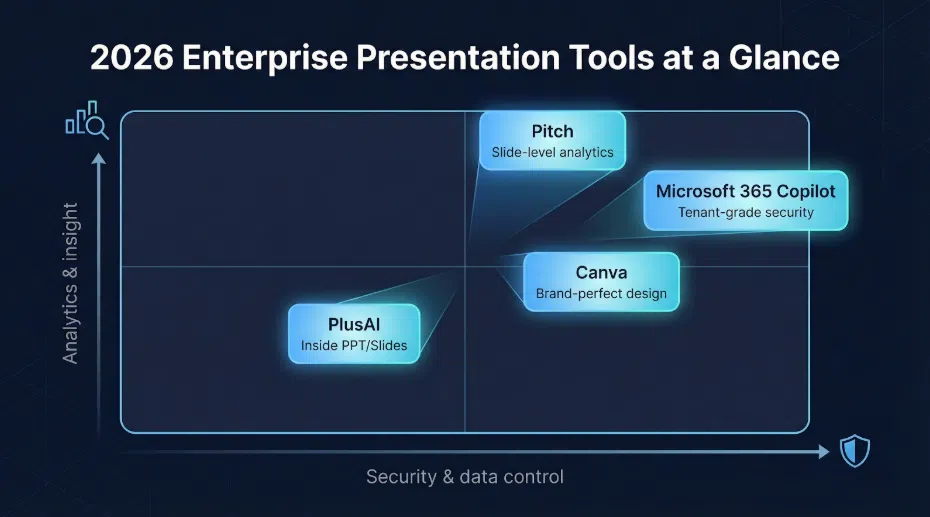
If you need slide-level analytics, Pitch leads the pack. If data must stay inside your tenant, Copilot is the safest choice. Designers who prize brand-perfect visuals will lean toward Canva, while teams committed to PowerPoint or Slides can get PlusAI running in minutes.
Visual snapshot of how PlusAI, Microsoft 365 Copilot, Canva, and Pitch differ on security and analytics focus.
PlusAI: friction-free AI inside PowerPoint and Google Slides
Teams that already live in PowerPoint or Google Slides rarely want to learn a new editor. PlusAI appears in those familiar ribbons as an add-in: open the sidebar, describe your deck, and click Generate. The tool drafts an outline, fills text boxes, and suggests charts. Remix swaps layouts, while Rewrite tightens wording, so no manual box dragging is required.
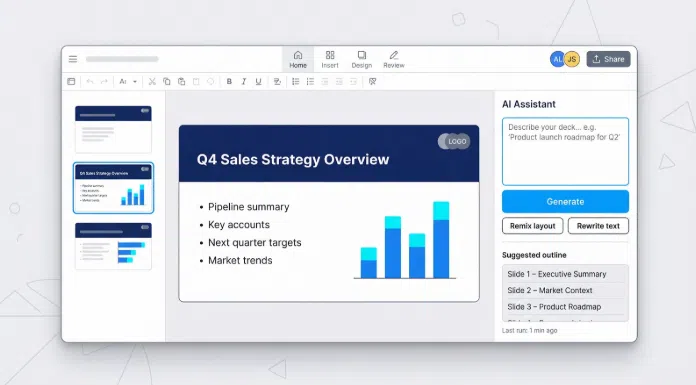
Because everything happens inside Office or Workspace, co-authoring, version history, and cloud storage work exactly as before. Upload a corporate template and the AI applies your fonts, colors, and logo placement on every slide, which keeps brand reviewers happy.
Security checks the usual enterprise boxes. PlusAI encrypts data in transit and at rest and holds a SOC 2 Type II report. SSO and dedicated onboarding unlock on the Enterprise tier. According to PlusAI, the add-in has more than one million installs across Google Workspace and Microsoft marketplaces.
Pricing is straightforward. The Basic plan is USD 15 per user per month on monthly billing (USD 10 on annual billing) and includes a seven-day free trial.
Choose PlusAI for fast-moving sales or product teams that build decks every day but prefer to stay in PowerPoint or Slides. If your presenters sigh at new software, this add-in turns resistance into results within minutes.
Microsoft 365 Copilot: the built-in path for Microsoft-centric teams
If your organization already licenses Microsoft 365, Copilot appears as a chat pane inside Word, PowerPoint, Excel, Outlook, and Teams. Because the AI runs inside your tenant, prompts and output inherit the same identity, compliance, and DLP policies that cover the rest of Microsoft 365, according to Microsoft.
Security is Copilot’s headline benefit, and the numbers help justify the spend.
- Pricing: USD 30 per user each month, added to an existing E3, E5, or Business plan and paid annually.
- Time saved: Early-access users report an average of 14 minutes returned to their day, or nearly five hours each month, according to Microsoft’s WorkLab research.
- Scale proof: IT services firm Presidio’s 300-seat pilot reclaimed about 1,200 employee hours every month, according to a Microsoft customer case study.
What Copilot does in PowerPoint:
- Converts a Word document or Teams transcript into a first-draft deck, complete with speaker notes.
- Rewrites slide text on command.
- Pulls live numbers from Excel, so charts stay current without manual updates.
Design remains “corporate safe,” so many marketing teams still pair Canva or PlusAI for extra polish. Implementation is simple: admins assign the add-on in the Microsoft 365 portal, users keep the ribbon they know, and IT skips another vendor security review.
Choose Copilot when tenant-grade data protection outranks advanced design wishes, and the budget can handle the premium per-seat price. A practical approach is to license finance, operations, or executive-communications teams first, then expand once time-savings data proves the case.
Canva Magic Studio: design strength with enterprise guardrails
Canva’s reach speaks for itself: company statements note that 95 percent of Fortune 500 companies rely on the platform for visual content. Magic Studio layers generative AI onto the editor your marketing team already knows.
Type a plain-language prompt, and Magic Design produces slides, images, and speaker notes in seconds. Behind the scenes, it selects from thousands of templates and applies your Brand Kit—logo, fonts, and colors—so every deck ships on brand without designer intervention.
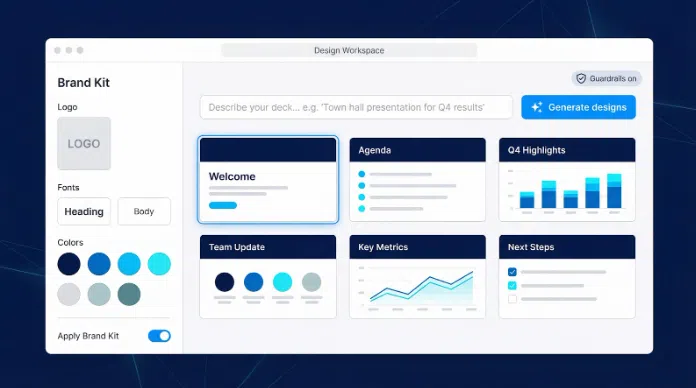
Collaboration is native. Teammates co-edit, comment, and restore versions instantly. During live sessions, Canva Live lets viewers react or post questions without plug-ins, which helps for webinars and town halls.
Security and IP coverage arrive under Canva Shield. The package bundles role-based AI controls with an indemnity that protects enterprise customers if an AI-generated asset triggers an infringement claim. Single sign-on and granular permissions unlock on the Enterprise tier.
Pricing stays predictable. Canva Business costs USD 20 per user each month on monthly billing, according to Canva’s public pricing page. Most companies pilot on Business, then upgrade to Enterprise once brand teams see how much off-brand PowerPoint clutter disappears.
Choose Canva when polished visuals and strict brand consistency outrank deep analytics, and when you need a tool non-designers can learn in minutes.
Pitch: engage prospects with decks that track themselves
Pitch has moved beyond a simple cloud-based PowerPoint alternative. Since its 2025 overhaul, the platform combines AI-assisted creation with engagement analytics that tell sales teams exactly which slides win deals.
Start a deck with a prompt such as “Series B investor update.” Pitch storyboards the flow, drafts headlines, and inserts charts that stay linked to Google Sheets or HubSpot, so the growth curve on slide 3 updates the moment finance changes the sheet.
For a real-world startup example of this prompt-to-deck workflow, see this AI-powered pitch deck generator for startups.
Sharing is where Pitch pulls ahead. Each deck produces a private URL. When a prospect opens it, you receive real-time alerts plus a heat map of time spent per slide. Revenue teams A/B-test narratives, retire slides that underperform, and focus on the ones that convert.
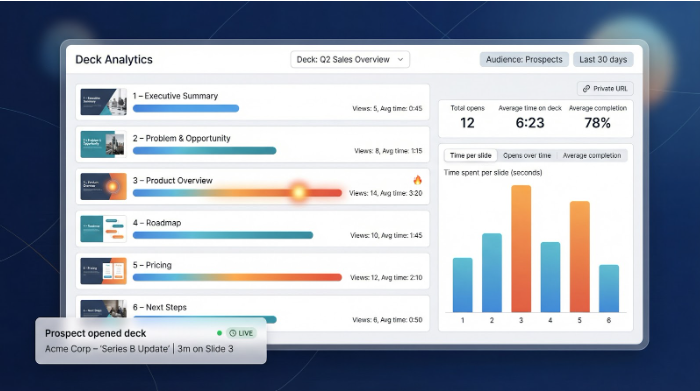
Collaboration feels familiar: teammates assign slide ownership, comment in real time, and co-present live, eliminating “next slide, please” hand-offs. Workspace themes lock fonts and colors, so even AI-generated layouts stay on brand.
Pricing is straightforward.
- Free: up to five members.
- Pro: USD 22 per month for the first two seats; additional seats billed per seat.
- Enterprise: custom pricing with SAML-based SSO and a dedicated success manager.
All plans run in Pitch’s SOC 2-certified cloud, though highly regulated industries may still need an internal security review.
Choose Pitch when the key question isn’t “Did they see the deck?” but “Which slide made them reply?” It closes the feedback loop between content and outcome, something static presentations simply can’t do.
How to choose: a quick decision path
Start with the one factor you cannot compromise, then follow the branch that matches it.
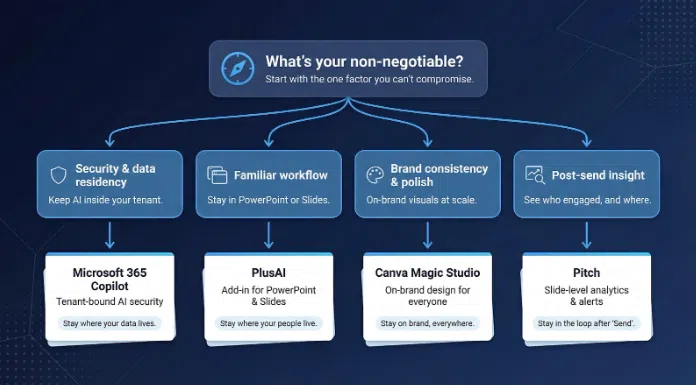
- Security and data residency. Pick Microsoft 365 Copilot. Tenant-bound processing keeps prompts and output inside the same compliance controls that already cover your documents, which justifies the USD 30 per user premium.
- Familiar workflow, fast. Choose PlusAI. The add-in lives in PowerPoint and Google Slides and costs USD 15 per user per month when billed monthly, USD 10 on annual billing.
- Brand consistency and polish. Go with Canva Magic Studio. Canva Business is USD 20 per user each month, and the Enterprise tier layers on Canva Shield indemnity, while the platform already appears in 95 percent of Fortune 500 teams.
- Post-send insight. Select Pitch. Slide-level heat maps and open alerts come with the Pro plan, USD 22 per month for two seats.
Quick cheat sheet:
- Stay where your data lives → Copilot
- Stay where your people live → PlusAI
- Stay on brand, everywhere → Canva
- Stay in the loop after “Send” → Pitch
Our scoring method: how we ranked the tools
We weighted six criteria that appear in nearly every enterprise RFP:
|
Factor |
Weight |
|
Security & compliance |
25 percent |
|
AI generation quality |
20 percent |
|
Viewer analytics depth |
20 percent |
|
Workflow fit & integrations |
15 percent |
|
Collaboration & brand control |
10 percent |
|
Price (mid-tier plan) |
10 percent |
Sources and sampling:
- Hands-on testing with live decks in August–September 2025, vendor documentation and public roadmaps, and independent coverage, including the VoiceTechHub “Secure AI” roundup that tracks SOC 2 and ISO 27001 attestations
Pricing reflects publicly posted mid-tier plans as of November 2025 (no promotional discounts). Features still in closed beta did not earn points.
Why the structure matters: a platform that dazzles with design but fails SSO will stall in security review; one that nails compliance yet omits analytics leaves revenue teams blind. The weighted matrix forces those trade-offs into the open.
We refresh scores every six months, or sooner if a vendor ships a major release, because in generative AI, today’s runner-up can top the chart after a single update. The numbers in this article therefore represent the best public evidence available as of December 2025.
Conclusion
Enterprise presentation tools have crossed a clear threshold. In 2026, the question is no longer whether AI belongs in slide creation, but where it fits best in your organization’s workflow, security model, and success metrics.
The comparison makes one thing clear: each platform optimizes for a different “non-negotiable.”
- Microsoft 365 Copilot is the safest bet for organizations where data residency, compliance, and IT control outweigh cost concerns. By keeping everything inside the Microsoft tenant, it minimizes risk and friction—at a premium price.
- PlusAI delivers the fastest path to productivity for teams entrenched in PowerPoint or Google Slides. Its add-in model removes change management barriers and offers strong ROI for everyday deck creation.
- Canva Magic Studio shines where brand consistency and visual polish matter most. It empowers non-designers to produce on-brand decks at scale, reducing review cycles and design bottlenecks.
- Pitch reframes presentations as measurable assets. Its analytics close the loop between content and outcome, making it especially valuable for sales, fundraising, and go-to-market teams.
The most successful enterprises won’t standardize on a single tool by default. Instead, they’ll map tools to use cases—Copilot for regulated teams, PlusAI for operational velocity, Canva for brand-led storytelling, and Pitch for revenue impact.
With budgets under pressure and AI capabilities evolving fast, the winners in 2026 will be teams that measure ROI in hours saved, risk avoided, and decisions influenced, not in slide templates. Choose the platform that protects what matters most to your business—and let AI handle the rest.