AI Agents for Business: Types, Use Cases, and Getting Started
AI agents are software systems that take instructions in plain language, make decisions, and act on your behalf: browsing the web, drafting emails, querying databases, or executing multi-step workflows without waiting for a human to approve each step.
That description covers everything from a chatbot that books a meeting to a four-agent system that monitors foreign exchange rates, flags anomalies, and files compliance reports automatically. The practical question for most business buyers is not whether AI agents work. The evidence is strong enough. The question is which type of agent fits which problem and what it actually takes to get one running in a real operation.
This guide breaks down the main categories of AI agents for business use, which departments are deploying them today, what free and paid tools exist, and what a realistic first deployment looks like. For a deeper look at how multi-agent architectures are designed and built, see Multi-Agent Systems: Features, How They Work, and Real-World Examples.
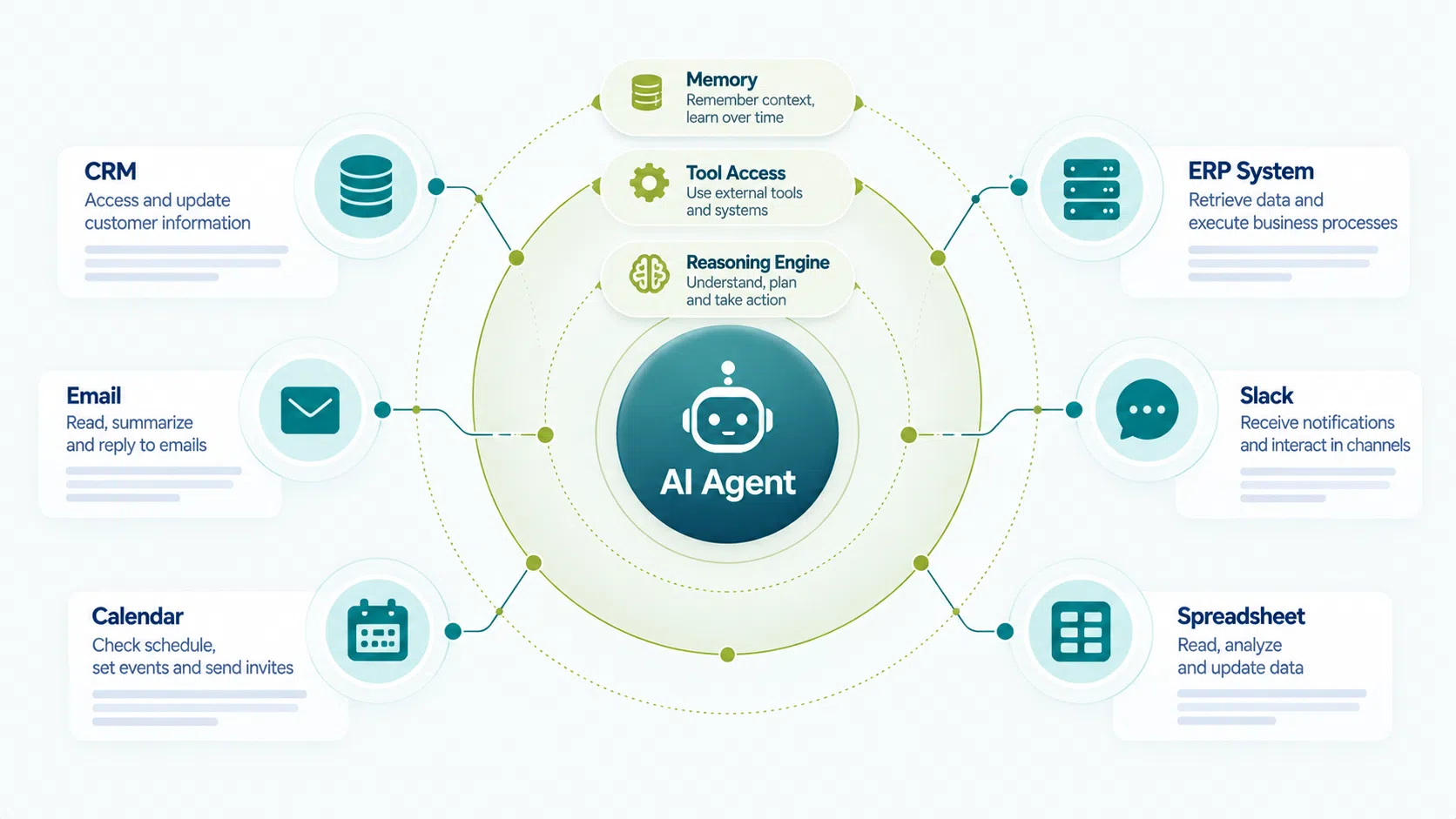
AI agents combine a reasoning engine, external tool access, and persistent memory to complete multi-step business workflows autonomously.
1. What is an AI agent, and how is it different from a chatbot?
An AI agent can take actions; a chatbot can only generate text.
A traditional chatbot responds to a message. It generates the next sentence and stops. An AI agent connected to the same language model goes further: it can read your CRM, update a ticket in Jira, send a Slack notification, and log the outcome, all from a single natural-language instruction. The difference is tool use and autonomous decision-making.
Three components define an AI agent for business:
Reasoning engine
A language model (GPT-4o, Claude 3.5 Sonnet, Gemini 1.5 Pro) that interprets instructions and decides what actions to take.
Tool access
APIs, databases, email clients, calendars, and ERP systems: the external systems the agent can read from and write to.
Memory structure
Context carried across workflow steps, not just within a single conversation turn. This is what lets an agent complete a multi-step process rather than answering a single question.
When these three components are combined and multiple agents collaborate, the result is a multi-agent system (MAS). For the full architectural picture behind enterprise AI development, see What Is AI Development: A Complete Guide. This article focuses on the business layer: what agents do, where they create value, and what deployment requires.
2. What are the main types of AI agents for business?
Four agent types cover most enterprise use cases: task automation agents, research and synthesis agents, process orchestration agents, and customer-facing agents. The type determines how much autonomy the agent has, what tools it needs, and how much oversight your team needs to maintain.
| Agent type | What it does | Typical tools | Autonomy level |
| Task automation | Executes repeatable single-step tasks: data entry, scheduling, report generation | CRM, calendar, and spreadsheet APIs | Low: pre-defined rules |
| Research & synthesis | Searches the web, reads documents, summarizes findings, and surfaces relevant data | Web search, document stores, RAG pipelines | Medium: goal-directed |
| Process orchestration | Coordinates multiple steps and sub-agents across a full workflow (approval chains, procurement, compliance checks) | ERP, ticketing, messaging platforms | High: multi-step, self-correcting |
| Customer-facing | Handles inbound queries, qualifies leads, routes tickets, and escalates to humans | Help desk, CRM, chat interfaces | Medium: escalation built in |
3. Where are businesses deploying AI agents today?
The highest ROI deployments in 2026 are concentrated in four departments: sales and marketing, finance operations, customer support, and software development. IBM’s 2025 Global AI Adoption Index found that 78% of enterprises have deployed or are actively deploying AI in at least one business function, with productivity and cost reduction cited as the primary drivers.
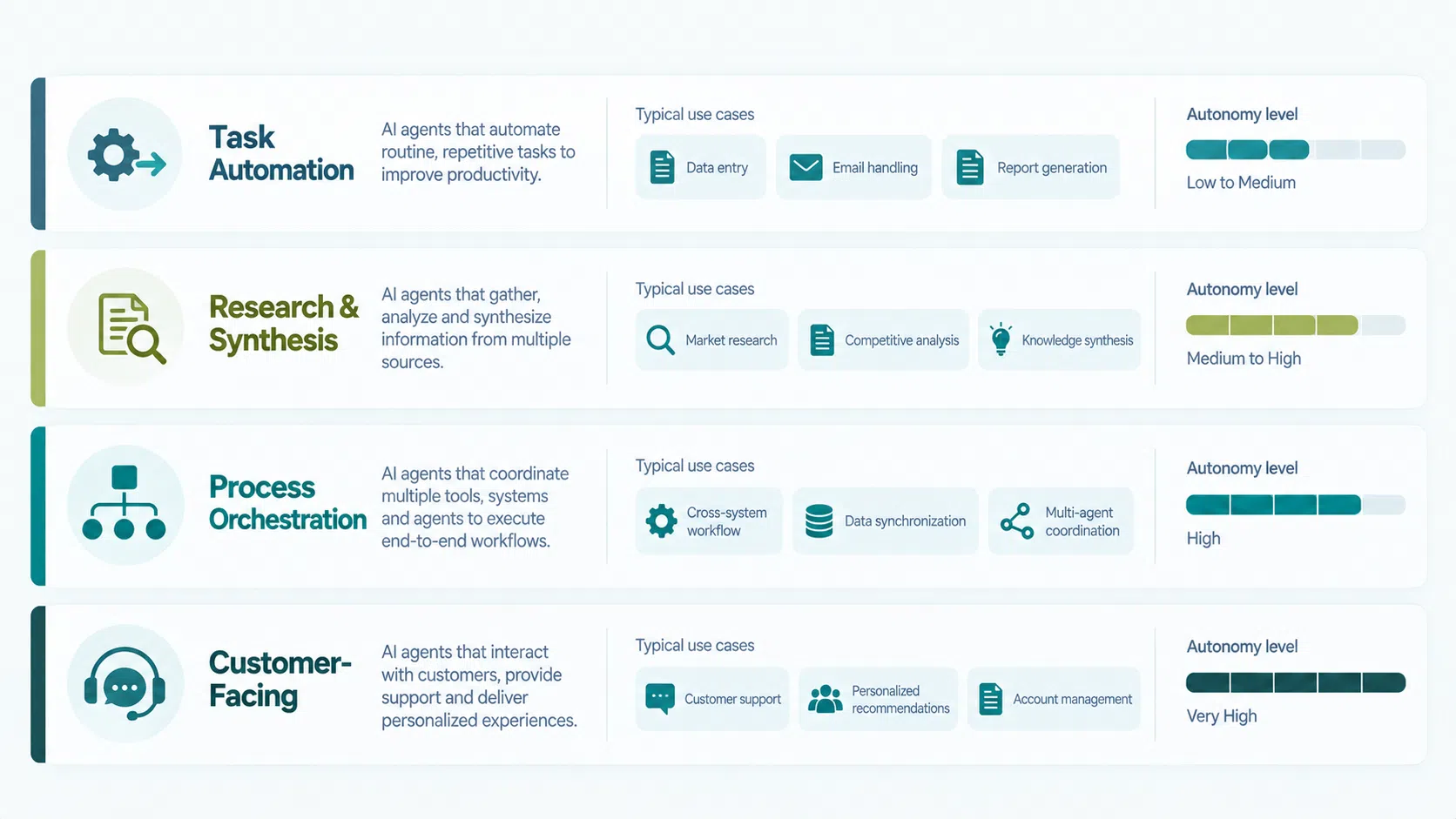
The four primary agent types differ in autonomy level, tool requirements, and the degree of human oversight needed.
Sales and CRM
Agents monitor inbound leads, score prospects against ICP criteria, draft personalized outreach, schedule follow-ups, and update CRM records automatically. A mid-market B2B team using a sales agent typically recovers 6 to 8 hours of SDR time per week per representative by eliminating manual data entry and follow-up sequencing.
Finance and accounts payable
Invoice processing agents extract line items from PDFs, match against purchase orders, flag discrepancies, and route for approval, reducing processing time from 3 to 5 days to under 4 hours in documented deployments. For a South Korea-based FX firm, Savvycom deployed a four-agent system handling rate checking, settlement configuration, and audit logging, cutting FX processing time by 60%.
Customer support
Tier-1 support agents resolve straightforward queries autonomously: password resets, order status, and policy lookups. They hand off complex cases to humans with a structured context summary. Deflection rates of 40 to 60% are achievable in the first 90 days for teams with a well-structured knowledge base.
Software development
Developer agents using tools like GitHub Copilot Workspace, Cursor, or custom-built systems with AutoGen write unit tests, review pull requests, generate documentation, and identify security vulnerabilities. Teams report 20 to 40% reductions in code review cycle time when agents handle the first-pass review.
4. What are the best AI agents for small business?
Small businesses get the fastest time-to-value from out-of-the-box agent platforms rather than custom-built systems. The distinction that matters most for small teams: no-code/low-code agent platforms versus custom-built agent frameworks. Custom frameworks (LangGraph, AutoGen, CrewAI) offer the most control but require engineering time and ongoing maintenance. For a team without a dedicated AI engineer, starting with a platform reduces deployment from months to days.
Make (formerly Integromat)
Free tier availableNo-code · SaaS integrations
No-code automation with AI steps. Suitable for connecting existing apps (CRM, email, spreadsheets) with AI-powered decision steps. Free tier: 1,000 operations/month.
Zapier AI
Free tier availableNo-code · Broad app library
Similar to Make with a broader app library. AI actions let agents write, summarize, classify, or extract data as part of multi-step zaps. Free tier: 100 tasks/month.
Beam AI
Trial availableBusiness operations · Pre-built templates
Purpose-built agentic automation targeting business operations. Pre-built agent templates for finance, HR, and sales workflows. Paid plans with a trial available.
Relevance AI
Low-codeCustom API connections · Revenue ops
Build and deploy custom AI agents through a visual interface. Supports tool connections to external APIs and databases. Used by revenue and ops teams at mid-market companies.
Microsoft Copilot Studio
EnterpriseMicrosoft 365 · Azure
Enterprise-grade agent builder within the Microsoft 365 ecosystem. Best fit for organizations already on Azure and Teams. Free trial available; requires Microsoft 365 subscription for full deployment.
5. Are there free AI agents for business?
Free tiers exist across most major agent platforms, but free deployments have task limits, restricted integrations, and no SLA. This makes them viable for evaluation but not for production workloads.
| Platform | Free limit | Key restriction | Best use |
| Make | 1,000 operations/month | 2 active scenarios | Test one workflow end to end |
| Zapier | 100 tasks/month | Single-step zaps only | Simple linear flow proof of concept |
| n8n (self-hosted) | Unlimited (self-hosted) | Requires server setup and technical skill | Small businesses with a developer on team |
| CrewAI (open source) | Unlimited (local) | Python required; no UI | Developers building custom agents locally |
6. How do you get started with AI agents for your business?
The single highest-value first step is identifying one repetitive, rule-based workflow with a clear input, a defined output, and measurable volume, then deploying a single agent against that workflow before expanding.
Most failed agent deployments share one characteristic: they start with the agent and work backwards to find a use case. The sequence that consistently works:
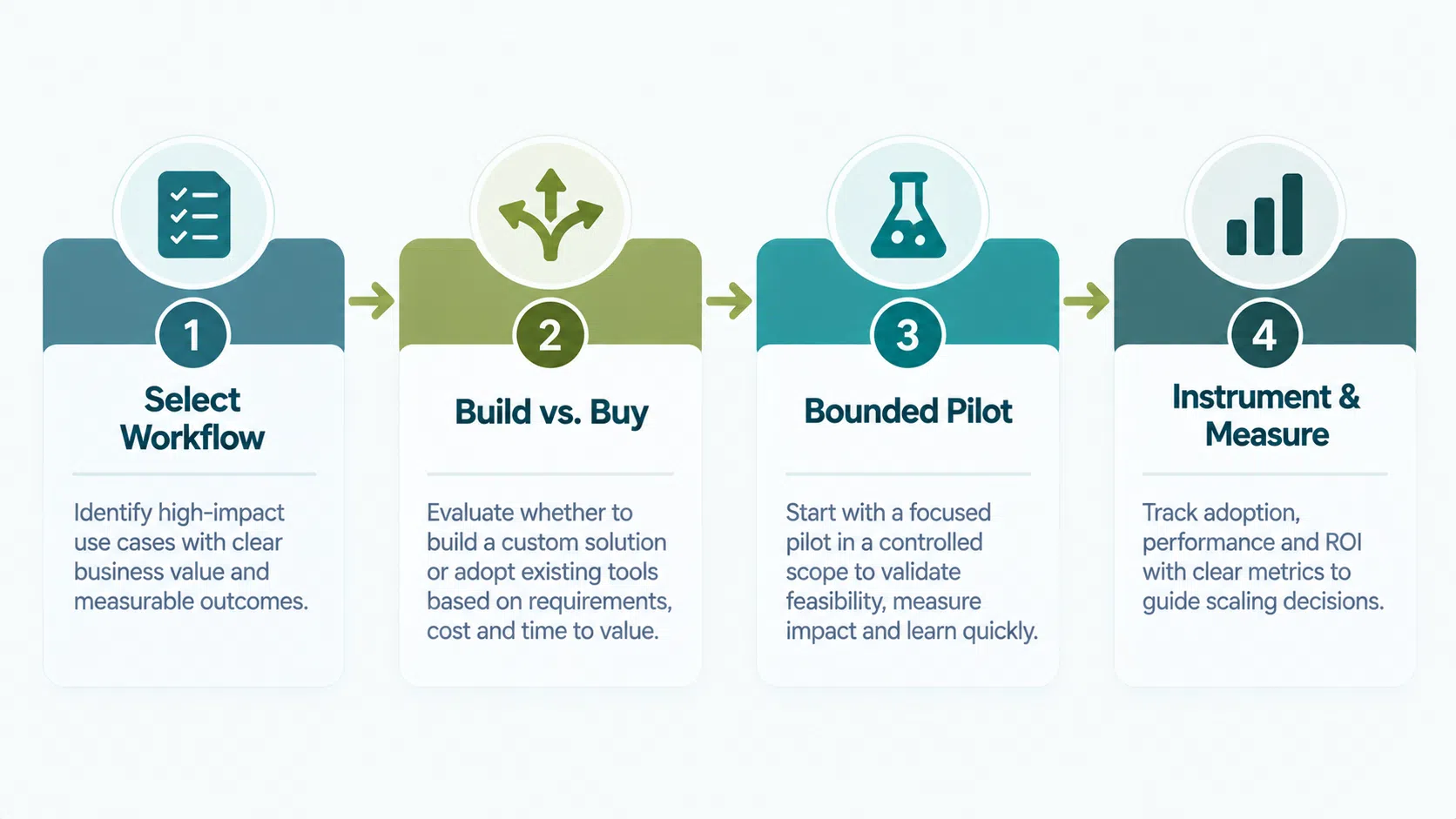
The four steps to a successful first AI agent deployment: start with the workflow, choose platform vs. custom build, run a bounded pilot, and instrument before you automate.
Step 1: Start with workflow selection, not tool selection
List workflows your team repeats more than 20 times per week. Filter for ones with a defined trigger (email arrives, form submitted, invoice received), a consistent process, and a measurable output. These are your candidates.
Step 2: Evaluate build vs. buy at the workflow level
If your workflow connects existing SaaS tools (Gmail, Salesforce, HubSpot, Slack), a no-code platform like Make or Zapier is almost always faster than a custom build. If your workflow touches proprietary data, requires domain-specific compliance, or involves multi-step decision logic, a custom agent is the right call.
Step 3: Run a bounded pilot before scaling
Deploy the agent against 10 to 20% of actual volume with human review on every output for the first 2 weeks. This surfaces edge cases and calibrates trust before the agent runs autonomously. Gartner notes that organizations that pilot AI in a contained environment are 2.5x more likely to report successful outcomes.
Step 4: Instrument before you automate
Define success metrics before the pilot starts: processing time per task, error rate, escalation rate, cost per transaction. Without a baseline, it is impossible to measure whether the agent is delivering value or merely completing tasks.
7. What does it cost to deploy an AI agent for business?
Cost depends primarily on whether you use a platform, build a custom agent, or engage a development partner, with ranges from effectively zero (open-source, self-hosted) to $150,000+ for a production-grade custom multi-agent system.
| Approach | Upfront cost | Monthly cost | Best for |
| No-code platform (Make, Zapier) | $0 setup | $20 – $500+ | Teams with no engineering capacity; standard SaaS workflows |
| Low-code platform (Relevance AI, Beam AI) | $0 – $5,000 setup | $200 – $2,000+ | Ops and revenue teams; moderate customization needed |
| Open-source framework (n8n, CrewAI) | Server costs only | $50 – $500 hosting | Technical teams; maximum control; no per-task fees |
| Custom development | $30,000 – $150,000+ | $2,000 – $15,000 maintenance | Enterprise workflows; compliance-heavy; proprietary data |
The HIPAA compliance premium, where applicable, adds 15 to 25% to custom agent development costs. For sectors like healthcare, finance, or legal, this is an architecture requirement, not an optional line item.
8. Frequently asked questions
Exploring AI agents for a specific business workflow?