
AI-Powered Document Processing: How It Works and Real Enterprise Results (2026)
Most enterprise knowledge work starts with a document. A contract is waiting for review. An invoice sitting in an inbox. A medical record that needs to be matched to a billing code. The volume of these documents has grown faster than the teams that process them, and manual handling has become the operational bottleneck that touches almost every department.
AI-powered document processing addresses that bottleneck directly. According to McKinsey’s State of AI 2025 survey, 88% of organizations now use AI in at least one business function, up from 72% in 2024 and 55% in 2023, driven in large part by document-intensive workflows where automation delivers measurable, quantifiable results. Organizations that have automated high-volume document workflows report 60 to 70 percent reductions in processing time, with error rates falling from the 1 to 5 percent range of manual entry to under 0.5 percent.
This article covers what AI document processing is, how the technology pipeline works, what results enterprises are actually seeing in production, and what to look for when evaluating a solution or a development partner. For the foundational model concepts behind these systems, see Savvycom’s guide on AI development.
1. What is AI-powered document processing, and how does it differ from traditional OCR?
AI-powered document processing is the use of machine learning, computer vision, and natural language processing to automatically capture, classify, extract, validate, and route data from business documents without requiring a human to read and re-key the information.
It is worth distinguishing this from two things it is often confused with. Traditional OCR (optical character recognition) converts scanned images into machine-readable text but does nothing with that text once extracted. Rule-based automation adds templates that capture specific fields from fixed-layout documents, but breaks whenever a supplier changes their invoice format or a contract arrives in an unexpected structure.
AI document processing does something qualitatively different: it understands context. It can read a clause in a logistics contract and recognize it as a liability limitation even if the exact wording differs from every other contract in the training set. In practice, intelligent document processing (IDP) systems serve as the data infrastructure layer that turns the unstructured content locked inside documents into structured, actionable data that downstream systems, ERP, CRM, compliance platforms, and workflow engines can actually use.
2. How AI document processing works: the 5-stage pipeline
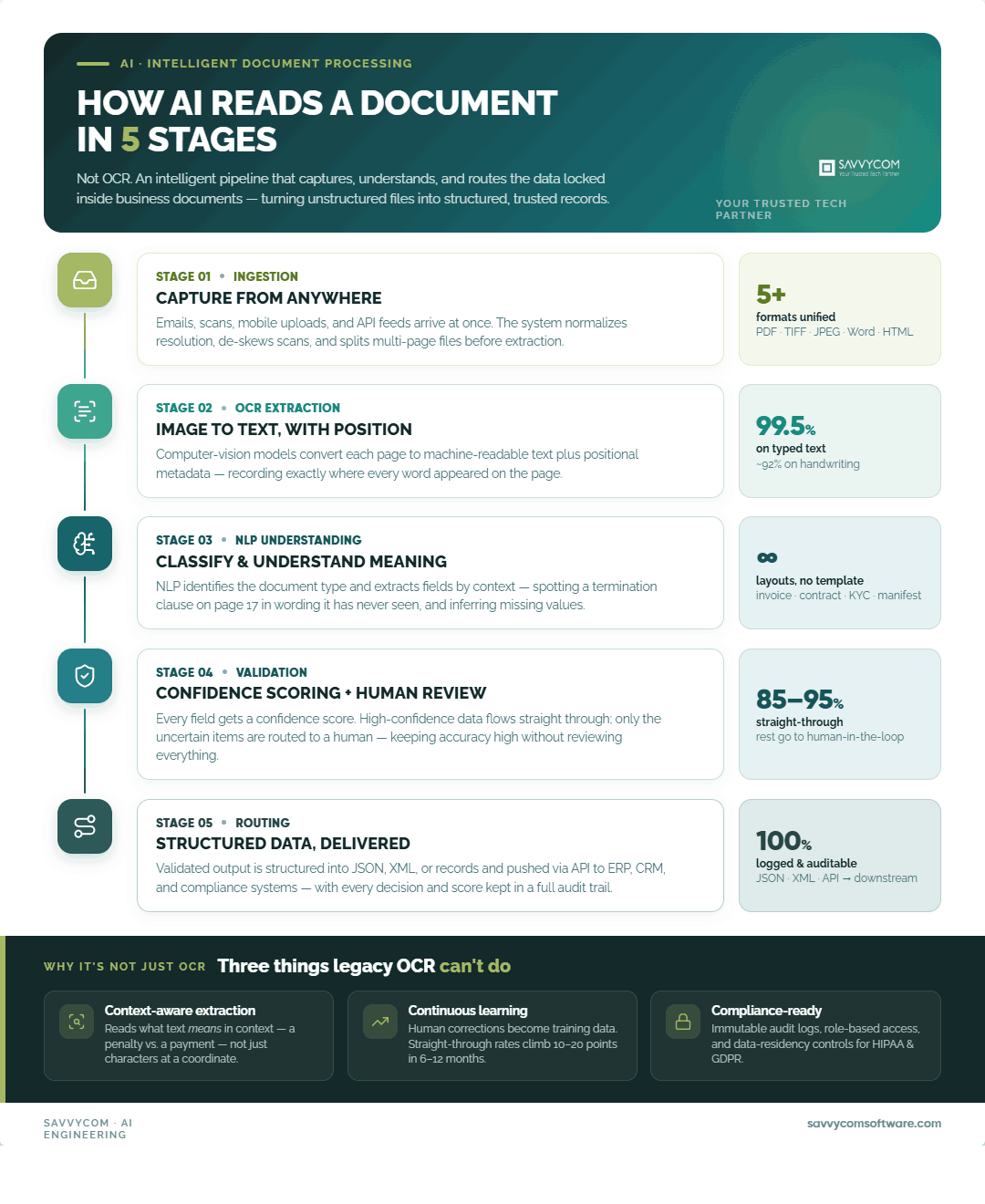
Most production IDP systems follow a consistent 5-stage pipeline consisting of document ingestion, OCR extraction, NLP classification, validation confidence scoring, and output routing. Understanding each stage helps engineering teams scope integration work and helps business stakeholders set realistic expectations about where human oversight is still needed.
- Document ingestion: The system receives documents from multiple sources simultaneously: email attachments, scanned files, mobile uploads, and API feeds. Formats include PDF, TIFF, JPEG, Word, and HTML-formatted emails. The ingestion layer pre-processes each file by normalizing resolution, correcting skewed scans, and splitting multi-page documents before passing them to extraction.
- OCR and initial extraction: Computer vision models convert the document image to machine-readable text. Modern OCR achieves 99.5 percent accuracy on standard typed documents and around 92 percent on handwriting (ABBYY benchmark data). The output is raw text with positional metadata, which tells the system where each word appeared on the page.
- NLP classification and semantic extraction: NLP models classify the document type (invoice, contract, KYC form, shipping manifest) and extract the relevant fields. An NLP model trained on legal documents can identify a termination clause even if it appears on page 17 in wording it has never seen before. LLM-based extraction goes further, inferring missing values by reasoning across context. If an invoice has a smudged total, the model adds up the line items to reconstruct it.
- Validation and confidence scoring: Each extracted data point receives a confidence score. High-confidence extractions pass through automatically. Low-confidence ones are queued for human review. This human-in-the-loop (HITL) mechanism keeps accuracy high without requiring humans to review everything. Enterprise deployments typically achieve 85 to 95 percent straight-through processing rates (Azure AI Document Intelligence, 2026 benchmark).
- Output routing and system integration: Validated data is structured into JSON, XML, or database records and pushed to downstream systems via API. A contract review output might route high-risk clauses to a legal workspace while simultaneously writing extracted metadata to a compliance database. Every extraction decision and confidence score is logged in a full audit trail.
What capabilities separate AI document processing from legacy OCR?
The difference between a modern IDP system and a traditional OCR setup is not a matter of degree. It is a different category of tool, defined by five capabilities.
- Context-aware extraction: Where OCR captures text at a specific coordinate on a page, AI extraction understands what that text means in relation to surrounding content. It can identify that a figure is a penalty amount rather than a payment amount based on sentence structure, without needing a template for that specific document layout.
- Multi-format and multi-language handling: The system processes PDFs, handwritten forms, photographs of physical documents, and email bodies through the same pipeline. Leading platforms handle 200-plus languages, which matters significantly for enterprises operating across Southeast Asia, Japan, and South Korea.
- Confidence scoring with HITL routing: A system claiming 99 percent accuracy is only useful if it knows which 1 percent it got wrong and routes those to a human reviewer. The combination of high straight-through processing rates and targeted human review is what production deployments actually rely on.
- Continuous learning: When a human reviewer corrects an extraction, that correction feeds back into the model. Documents that were exceptions in month one become training data by month three. Over a six- to twelve-month period, straight-through processing rates typically improve by 10 to 20 percentage points on a given document type.
- Audit trail and compliance infrastructure: Every extraction decision, confidence score, and human override must be logged for regulated industries. Enterprise-grade IDP systems should provide immutable audit logs, role-based access controls, and configurable data residency options that satisfy HIPAA, GDPR, and financial compliance requirements.
3. Which document types are enterprises automating in 2026?
The categories with the highest automation ROI are those where volume is high, formats are variable, and errors carry significant downstream costs.
Five document categories account for the majority of active IDP deployments in 2026.
- Legal and commercial contracts: Contract review automation handles variable clause structures, cross-references between sections, and jurisdiction-specific language patterns. A legal team that previously reviewed 40 percent of contracts manually can reach a point where it reviews only 4 percent, with AI flagging clauses that deviate from standard terms or exceed defined risk thresholds.
- Invoices and accounts payable documents: The highest-volume category for most finance teams. Invoice processing time drops from an average of 15 minutes to under 2 minutes with AI automation (Kofax benchmark). For an AP team processing 10,000 invoices per month, this translates to roughly 2,000 hours of manual work recovered annually.
- Medical records and clinical documentation: These carry HIPAA compliance requirements and clinical terminology recognition as additional constraints. NLP models trained on medical records must distinguish between a medication dosage and a billing code that happens to use similar numerical formatting.
- KYC and identity verification documents: Passports, national IDs, utility bills, and bank statements arrive in dozens of formats across multiple jurisdictions. AI systems that cross-validate extracted data against external databases can flag anomalies that manual review would miss, particularly relevant for fraud detection in onboarding workflows.
- Logistics and supply chain documents: Shipping manifests, bills of lading, customs declarations, and container tracking records. This category has seen some of the most technically interesting AI applications in 2026, particularly where computer vision is used to extract data from physical container markings and handwritten inspection notes at port facilities.
4. Real enterprise results: two production deployments
Production-grade IDP deployments demonstrate measurable efficiency improvements by processing document-intensive workflows autonomously while keeping humans in the loop for complex exceptions. Both deployments are under confidentiality agreements, so client names are not disclosed.
AI-Powered Contract Review System
- Industry & Region: Legal document processing · Logistics / Supply Chain · South Korea & Global
- Challenge: A leading logistics company in South Korea was manually processing vendor agreements and compliance documentation. As contract volumes grew with the business, the review backlog grew with them.
- Solution: Savvycom built an automated contract review platform on Google Cloud using a three-agent pipeline that handles the full review workflow from raw document ingestion through to risk-flagged summaries routed to the appropriate reviewer tier.
|
Agent |
Function |
|---|---|
|
Parsing Agent |
Extracts and classifies legal clauses from unstructured contract documents, matching them against a defined policy library. |
|
Legal Comparison Agent |
Identifies deviations from standard terms and assigns a severity score to each risk identified. |
|
Summary Agent |
Generates concise review summaries, routes high-risk contracts to senior reviewers, and auto-approves standard contracts. |
- Stack: Google Cloud Vertex AI · TensorFlow · BigQuery · GCP · Python (spaCy, NLTK)
- Results: 50% reduction in contract review time · 95% accuracy on critical clause extraction · 1,000+ contracts processed per month in production
AI-Powered Yard Management System (YMS)
- Industry & Region: Computer vision document processing · Logistics · Vietnam & Global
- Challenge: A global logistics operator managing 400 to 500 container movements per day faced a container tracking problem that was fundamentally a document and visual recognition problem: container IDs on physical units needed to be read, matched against shipping manifests, and logged without manual scanning.
- Solution: Savvycom built a real-time AI system combining computer vision for container identification with document processing for manifest matching and discrepancy detection.
- Agent Architecture:
|
Agent |
Function |
|---|---|
|
Vision Capture Agent |
Uses YOLOv8 and PaddleOCR to read container IDs, ISO codes, and condition markings from camera feeds in real time. |
|
Document Matching Agent |
Cross-references extracted container data against shipping manifests and customs documents, flagging discrepancies automatically. |
|
Reporting Agent |
Generates audit logs, exception reports, and operational summaries for port supervisors and logistics coordinators. |
- Stack: YOLOv8 · PaddleOCR · DeepSORT · Python · .NET · Kafka · Azure
- Results: 95% accuracy in container identification · 60% reduction in container search time · 35 to 40% improvement in yard throughput
Both deployments share a common architectural pattern: the AI handles the high-volume, structured portion of the work autonomously, while humans remain in the loop for edge cases. anomalies, and decisions that carry significant downstream consequences. The goal is not to remove humans from the process but to make their involvement deliberate rather than routine.
5. How should you evaluate an AI document processing solution?
Five criteria separate IDP solutions that perform in production from those that perform in demos. The market for IDP platforms and custom-built solutions has expanded quickly, and the range in quality is wide.
- Accuracy on your document types matters more than benchmark accuracy on standard datasets. A system that achieves 99 percent accuracy on clean typed invoices may perform at 78 percent on the handwritten inspection notes your operations team produces. Always run a pilot on a representative sample of your actual documents before committing.
- Integration depth with existing systems is where the real complexity lives. A document processing system that extracts data but cannot write it back to your ERP, CRM, or case management platform has not actually solved the problem. Evaluate API documentation, native connectors, and the vendor’s track record with integrations similar to your stack.
- Compliance infrastructure is non-negotiable for BFSI, healthcare, and legal use cases. Ask specifically about audit trail completeness, data residency options, and whether the system has been deployed in a regulated environment before. Certifications like ISO 27001 and SOC 2 are baseline signals, not proof of domain competence.
- Human-in-the-loop design quality is often what distinguishes vendors. A system with 90 percent straight-through processing but a poorly designed review interface means the 10 percent of exceptions take disproportionate time to resolve. Look at how exceptions are surfaced, how reviewers correct extractions, and whether those corrections feed back into the model.
- The production deployment track record is the final filter. Request references for live deployments, not proof-of-concept demos. Ask about the accuracy trajectory over the first six months, what the exception rate was at go-live versus six months later, and how the vendor handled document format changes introduced by a client’s counterparties.
6. Common implementation challenges and how to address them
- Scaling from a functional pilot to a full production deployment that successfully automates document-intensive workflows typically reveals three primary implementation hurdles. Document quality at the input stage is the most common and least anticipated issue. A model trained on clean scanned documents will underperform on photographs taken at an angle under poor lighting. Building well-designed pre-processing pipelines for deskewing, denoising, and resolution normalization is unglamorous work that rarely appears in vendor demos but determines real-world accuracy more than model architecture does.
- Unstructured and semi-structured document variety takes longer to handle than most scoping conversations anticipate. A business that believes it has one contract format typically discovers it has seven when it starts cataloging actual document samples. Allocate time in the discovery phase for a proper document inventory before building extraction models.
- Change management at the operational level is the challenge most frequently underestimated by technical teams. Staff who have been reviewing documents manually for years need to understand what the system is doing, trust its outputs on routine cases, and know how to handle exceptions efficiently. This issue is a training and workflow design problem, not a technology problem, and it benefits from being treated as such from the start of implementation.
7. Frequently asked questions
What accuracy rate should I expect from an AI document processing system?
For clean typed documents, modern systems achieve 95 to 99 percent field extraction accuracy. Handwritten content and unusual layouts typically land in the 85 to 92 percent range. The more useful metric is the straight-through processing rate: what percentage of documents can the system handle without any human review? Enterprise deployments typically reach 85 to 95 percent straight-through processing after three to six months of operation, as the model learns from reviewed exceptions.
How long does it take to implement an AI document processing system?
A focused deployment covering one document type with a defined integration target typically takes 10 to 14 weeks from requirements to production. Broader deployments covering multiple document categories and multiple downstream integrations run 4 to 6 months. The variable that most affects the timeline is the document inventory phase: how many distinct formats exist, how much variation exists within each format, and how much training data is available.
Which industries get the fastest ROI from document processing automation?
Invoice processing in finance and accounts payable consistently delivers the fastest ROI because volume is high, errors are costly, and the time savings are easy to quantify. Legal and compliance document review follows closely, particularly where contract volumes are growing faster than legal team headcount. Healthcare benefits significantly from clinical document automation but carries longer implementation timelines due to HIPAA compliance requirements.
Looking for a Trusted Tech Partner That Delivers Your Measurable Values?
Savvycom’s Document AI team has shipped contract review and computer vision document processing systems in production across South Korea, Vietnam, and Southeast Asia.
If you are scoping an AI document processing project and want to understand what is realistic for your document types and integration environment, the conversation starts here: AI Solutions.


