

Warehouse Management System Cost: Pricing, Hidden Costs and Build vs Buy
A warehouse management system (WMS) costs $100 to $500 per user per month as a cloud subscription. An on-premise license runs $2,500 to $200,000 per facility, before implementation. Those figures are published by Descartes, a WMS vendor. They come from a vendor page checked in November 2026. Over five years, the license is often not the largest line.
Integration, data migration, hardware, training and renewal increases decide the real budget. They also decide whether buying, building or extending your current system is cheaper. This guide sets out each cost, a realistic timeline and a five-year check you can run on any quote.
1. How much does a warehouse management system cost?
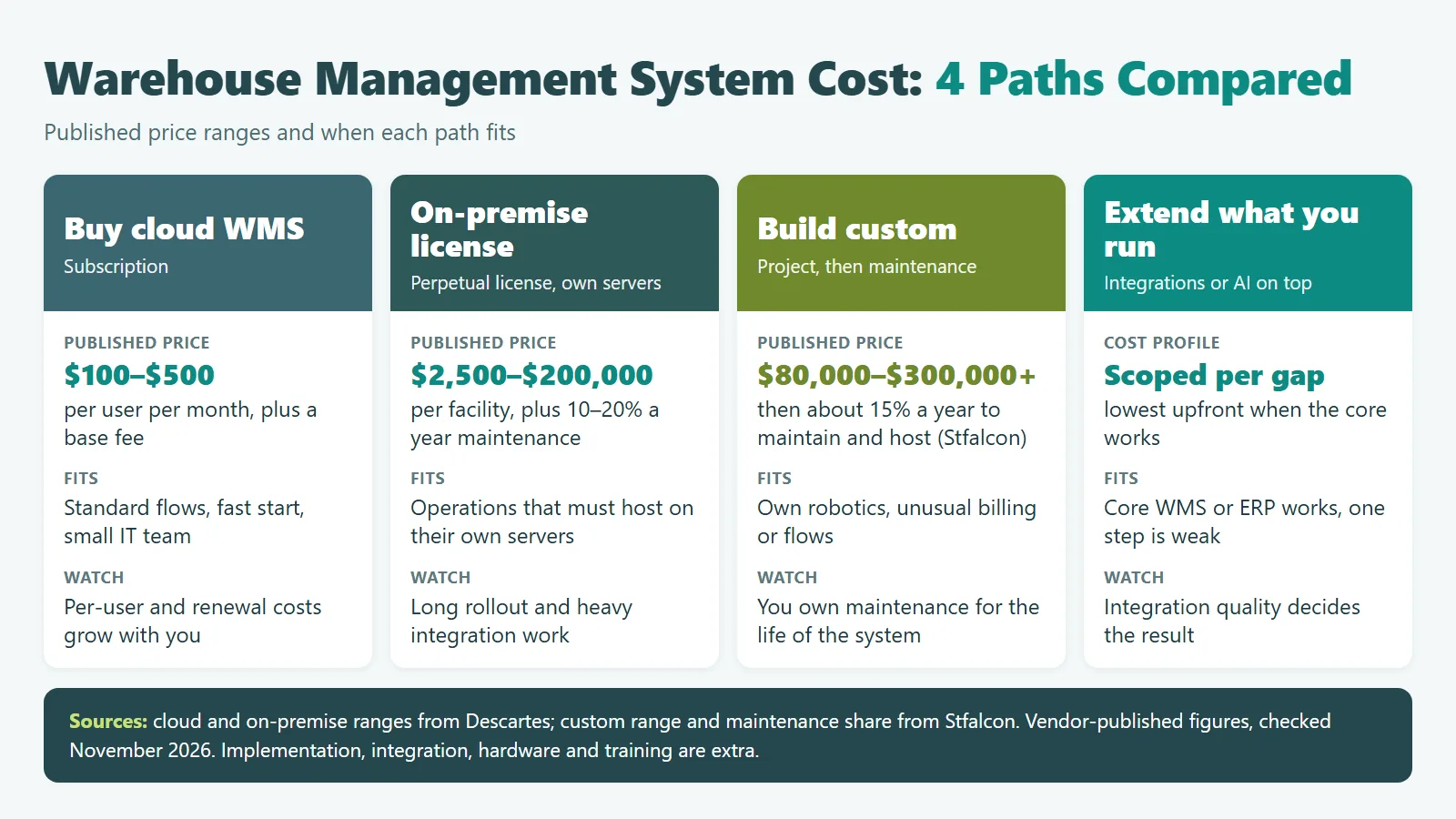
A warehouse management system costs $100 to $500 per user per month as a cloud subscription, according to Descartes. An on-premise license runs $2,500 to $200,000 per facility, plus annual maintenance. Custom builders such as Stfalcon quote $80,000 to $300,000 or more for a custom system.
The price depends on how you pay for it. Four models cover almost every quote you will see. Each one moves cost between the first year and the years after it.
| Model | Published price range | How you pay | Who it fits |
|---|---|---|---|
| Cloud (SaaS) WMS | $100 to $500 per user per month, plus a monthly base fee | Subscription, often per user, per site or per order | Single or multi-site warehouses with standard receiving, picking and shipping |
| On-premise license | $2,500 to $200,000 per facility, plus 10% to 20% a year for maintenance | Perpetual license, then annual support | Operations that must host on their own servers |
| WMS module inside an ERP | Quoted with the ERP; often no public list price | ERP license or subscription tier | Companies whose ERP already holds orders, stock and finance |
| Custom build | $80,000 to $300,000 or more | Project fee, then about 15% a year for maintenance and hosting (Stfalcon) | Unusual flows, own robotics or billing logic no product can configure |
Sources: cloud, on-premise and implementation ranges from Descartes; custom range and maintenance share from Stfalcon. All are vendor-published ranges, checked November 2026.
Tier-one suites do not publish price lists. Infor, Oracle and Blue Yonder were all Leaders in Gartner’s April 2026 Magic Quadrant for WMS. Products at that level are quoted by site, user, module and integration.
If your question is why a warehouse needs a WMS at all, start with our guide to the role of a warehouse management system. This page is about what it costs and how to choose.
2. Which WMS costs sit outside the license fee?
The costs outside the license are implementation, integration with ERP, TMS and carrier systems, data migration, scanners and printers, training, and support. Renewal increases add more each year. On a multi-site rollout these lines can exceed the license over five years, so ask for each one in writing before you compare quotes.
| Cost line | What drives it | What to ask the vendor |
|---|---|---|
| Implementation and configuration | Number of sites, process variants, custom reports | Fixed fee or time and materials? Who configures after go-live? |
| Integration | ERP, TMS, e-commerce, carriers, yard and automation equipment | Which connectors are standard, and what does each custom interface cost? |
| Data migration | SKU master quality, locations, open orders, history | Who cleans the data, and how many test loads are included? |
| Hardware | Handheld scanners, label printers, Wi-Fi coverage, servers if on-premise | Which devices are certified, and can you reuse what you own? |
| Training and change | Shift patterns, staff turnover, number of languages | Is training per site or per user? Are materials in local languages? |
| Support and renewals | Support tier, hours, renewal terms | What is the cap on annual price increases at renewal? |
Descartes puts standard implementation at $3,500 to $40,000, depending on integrations and customization. In its three-year model, Stfalcon assumes a 10% price rise at each SaaS renewal. Treat both as vendor figures, not benchmarks. They are still a fair test of a quote that leaves these lines blank.
Integration is where budgets move most. A WMS reads orders from an ERP, sends loads to a TMS and books carriers. Each link needs mapping, testing and an owner. Our transportation management software guide covers the TMS side of that link.
3. How long does WMS implementation take?
There is no neutral public benchmark for WMS implementation time. It depends on sites, integrations and data quality more than on the product. A single-site cloud WMS with standard connectors moves fastest, and multi-site rollouts run site by site. Plan each phase in weeks and add a buffer.
Why a buffer? A McKinsey and Oxford study of large IT projects found they ran 45% over budget on average. It covered IT projects in general and dates from 2012. Most WMS projects are smaller, so treat it as a warning, not a WMS benchmark.
Whatever you choose, the work runs through the same phases. Ask each vendor to put weeks against every one:
Discovery is the phase most often cut and most often regretted. Stfalcon, which builds custom WMS, budgets three to four weeks for it before quoting a fixed scope.
4. Should you build or buy a warehouse management system?
Buy a warehouse management system when your flows match what products already do, which is true for most warehouses. Build when your process is a competitive advantage that no product can configure. If you already run a WMS or ERP that works, extending it with integrations or AI is often the cheapest third path.
| Path | Choose it when | Main risk | Typical first-year cost profile |
|---|---|---|---|
| Buy cloud WMS | Standard flows, fast start, small IT team | Per-user and renewal costs grow with you | Low upfront, steady subscription |
| Buy tier-one suite | Large, complex, multi-country network | Long rollout, heavy integration | High license and implementation |
| Build custom | Own robotics, unusual billing or flows | You own maintenance forever | High upfront, then about 15% a year (Stfalcon) |
| Extend what you run | Core WMS or ERP works, gaps are specific | Integration quality decides the result | Lowest upfront if the core is sound |
- Your picking, slotting or billing logic is how you win customers
- You run equipment or robotics that products do not support
- You have, or can hire, a team to own the system for years
- Your current WMS works but misses one or two capabilities
- Your flows look like most warehouses in your sector
- You need to go live within months, not quarters
- You have no team to maintain software after launch
- Your vendor already offers the connectors you need
The fourth path is underused. Your WMS may be weak in one area only, such as yard visibility or slotting. A targeted extension through APIs can fix that part and leave the rest alone. Section 6 shows what that looks like in practice.
5. How do you compare WMS options over five years?
Compare WMS options on five-year total cost of ownership, not first-year price. Add license or build cost, implementation, integration, hardware, training, support, hosting and expected renewal increases for each year. Then add the cost of changes you will request after go-live, which buyers often forget.
Vendor models show how much the result depends on assumptions. Stfalcon modeled five sites and 65 users over three years. It put SaaS at $470,166 and a custom build at $273,500. That model comes from a company that sells custom builds, so test it against your own numbers.
| Line | Year 1 | Years 2 to 5 |
|---|---|---|
| License, subscription or build | Subscription or license fee, or build cost | Subscription with renewal increases, or about 15% a year for a custom system |
| Implementation and integration | Most of the project cost | New connectors when you add sites, carriers or channels |
| Hardware | Scanners, printers, Wi-Fi, servers | Device replacement cycle |
| People | Training, process owners, vendor hours | Training for new staff, admin time |
| Change requests | Fixes found in testing | New features the floor will ask for |
Run the same table for each option, with your own user counts and sites. If one option wins only under a perfect timeline, apply a buffer before you decide.
6. Can you add AI to an existing WMS instead of replacing it?
Yes, you can add AI to an existing WMS. The AI layer sits beside the WMS, TMS or ERP and connects through APIs or a message queue. The core system keeps its records while the AI layer handles one task, such as identifying containers or validating moves. This avoids replacing a system that the business still depends on every day.
Savvycom’s Operational AI in Logistics whitepaper describes this pattern. Legacy logistics systems are often heavily customized and business-critical. AI should connect to them through REST APIs or message queues, not replace them.
A global logistics provider’s container yards handled 400 to 500 container moves a day, with more than 500 containers on the ground. Staff found containers from manual records, and moves inside the yard were not recorded.
Over nine months from March 2024, Savvycom added AI camera recognition at the gates, real-time tracking, a digital yard map and AI-validated move orders. The system exposes REST APIs for other systems. Read the full AI yard management case study.
These results describe one client’s yards and setup, measured against its earlier manual process. The project replaced manual yard records rather than extending a WMS. It shows the pattern: add a focused layer where records break, and connect it to other systems through APIs. Our AI yard management system guide explains how that part works.
7. What changes for multi-site WMS rollouts in Asia-Pacific?
Multi-site rollouts across Asia-Pacific add languages, local tax and invoicing rules, currencies, data hosting choices and support across time zones. Each country adds configuration, testing and training. Budget per site rather than per project, and confirm which countries your vendor already supports.
- Language: floor staff need scanner screens and training in their own language.
- Tax and invoicing: e-invoicing and customs documents differ by country and connect through the ERP.
- Currency and billing: 3PLs that bill clients in several currencies need billing logic the WMS or ERP can handle.
- Hosting: some clients and sectors require data to stay in country, which narrows cloud options.
- Support hours: a vendor support desk in another time zone may be closed during your peak shift.
These items rarely appear in published price ranges, which mostly assume one country. For the wider picture, see our guide to logistics software development and our guide to supply chain visibility software.
8. How do you budget a custom WMS build or extension?
Budget a custom WMS build or extension from scope, team mix and duration, not a single price. With a Vietnam team, rates run $22 to $48 per hour for most roles, with senior AI and data roles reaching $55. Fix the scope in a short discovery before you accept any total.
A scope that names each flow, each integration and each site turns a range into a quote. Start with the step that costs you the most today, prove it on one site, then decide whether to extend or rebuild.
Savvycom’s smart logistics solutions team builds and modernizes TMS and WMS platforms and integrates them with ERP, telematics and EDI. The first two weeks run as a free assessment. You receive a solution outline and roadmap to evaluate before you commit.
Frequently asked questions
How much does a warehouse management system cost per month?
Cloud WMS pricing usually runs $100 to $500 per user per month, according to Descartes, plus a monthly base fee. Some vendors price per site or per order instead. Ask for the full monthly total at your user count, not the per-user headline.
What are the main types of warehouse management systems?
Warehouse management systems come in four main types. Standalone WMS products are licensed on their own, and cloud WMS is sold as a subscription. Some ERPs include a WMS module, and supply chain suites bundle a WMS with planning and transport. A custom-built system is a fifth option when no product fits your process.
Is SAP an ERP or a WMS?
SAP is best known for its ERP, SAP S/4HANA. SAP Extended Warehouse Management (EWM) is its WMS. It can run embedded in S/4HANA or as a separate, decentralized system. Licensing differs by deployment and by the features you use, so ask SAP or a partner for a quote based on your sites and processes.
How much does it cost to automate a warehouse?
Warehouse automation means equipment such as conveyors, sorters and robots, priced separately from WMS software. The WMS or a warehouse control system must integrate with that equipment. Budget for that integration as its own line in the WMS project, and confirm which equipment brands the WMS already supports.
Should a 3PL build or buy a WMS?
Most 3PLs should buy, because client onboarding, billing and carrier links are standard WMS features. Building fits a 3PL whose billing or service model is unusual, or one that wants its own platform as a product. Extending a working WMS is often the middle path.
Weighing a new WMS against extending the one you run? Talk to Savvycom’s logistics software team about your sites, systems and the step that costs you most.
Looking for a Trusted Tech Partner That Delivers Business Impact?
Savvycom is a Vietnam-based software company with 16+ years of delivery, 100+ enterprise clients and work in 30+ countries. Our teams build logistics, banking, healthcare and AI software for clients across Asia-Pacific and beyond.
Explore: Smart Logistics Solutions